






Introduction to OpenAI Prism
The company OpenAI has unveiled Prism – a free workspace for scientists, originally developed using AI and operating on the GPT-5.2 platform. This solution, as declared by the company, is designed for writing scientific texts and collaborating on research.
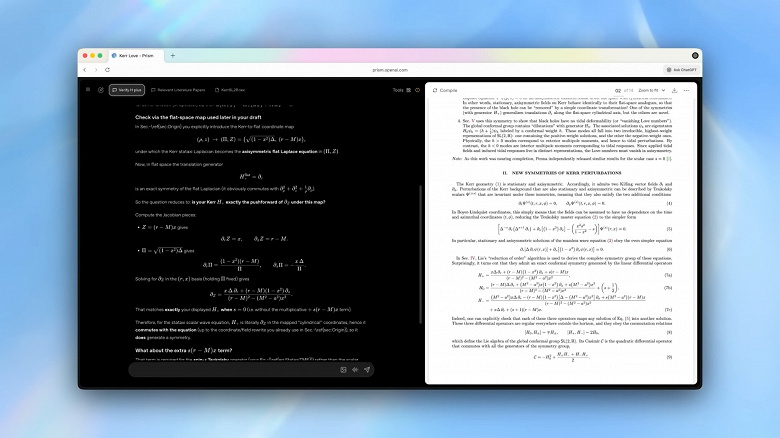
Prism allows the creation of an unlimited number of projects and the integration of an unlimited number of co-authors. According to the company, Prism is intended to solve the common issue related to the fragmentation of work tools. Researchers often switch between editors, PDF files, LaTeX compilers, bibliographic managers, and separate chat interfaces, losing context and breaking concentration. Prism is our first step toward eliminating this fragmentation.
GPT-5.2 Integration
Inside Prism, users can produce drafts, make edits, work on projects with others, prepare materials for publication, and more. Instead of functioning as a separate tool in the writing process, GPT-5.2 integrates directly into the project, having access to the article structure, equations, sources, and surrounding context.
Collaborative Features
Researchers can:
- Communicate with GPT-5.2 to explore ideas, test hypotheses, and reason about complex scientific issues in context.
- Create drafts and edit articles, taking into account the full context of the document, including preceding and succeeding text, equations, citations, figures, and the overall structure.
- Find and incorporate relevant literature (e.g., from arXiv) in the context of the current manuscript and refine the text with recently found related works.
- Create, refactor and analyze equations, citations, and figures with AI that understands how these elements are linked throughout the article.
- Translate equations or diagrams from the board directly into LaTeX, saving hours manipulating TikZ commands.
- Collaborate with co-authors, students, and academic supervisors in real-time, making edits, comments, and changes that are immediately reflected.
- Apply direct changes to the document directly in place upon request, without copying content between different editors or chat tools.
- Use optional voice editing to make simple changes without interrupting the writing or review process.